
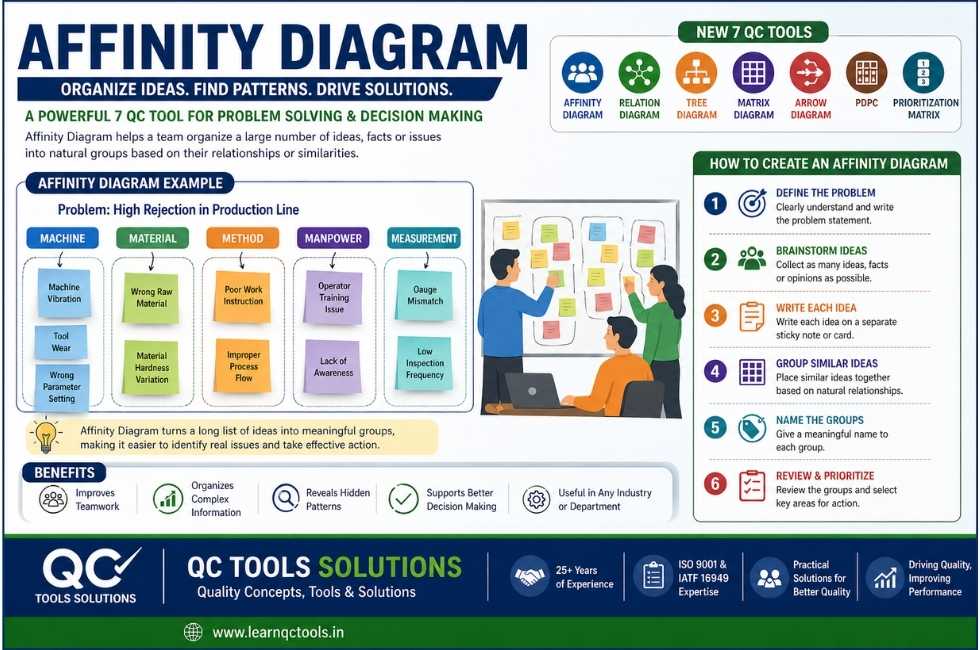
An Affinity Diagram is one of the most useful tools for organizing large numbers of ideas, opinions, problems, or data into meaningful groups. It is widely used in quality management, manufacturing, business improvement, brainstorming sessions, root cause analysis, and project planning.
When teams generate many ideas during discussions, it often becomes difficult to understand patterns or priorities. An Affinity Diagram helps convert confusion into clarity by grouping similar ideas into logical categories.
This tool is commonly included in the New 7 QC Tools (also known as 7 Management and Planning Tools).
In this complete guide, you will learn:
- What is Affinity Diagram
- Affinity Diagram definition
- Affinity Diagram example
- How to make an Affinity Diagram
- Affinity Diagram template
- Uses in manufacturing and quality management
- Difference between Affinity Diagram vs Tree Diagram
- Benefits and limitations
What is an Affinity Diagram?
An Affinity Diagram is a visual tool used to organize a large number of ideas, facts, opinions, or issues into natural groups based on their relationships or similarities.
It helps teams sort scattered thoughts into categories so they can identify common themes and make better decisions.
Simple Meaning
If many people give different ideas on one problem, an Affinity Diagram helps combine similar ideas into groups.
Affinity Diagram Definition
Affinity Diagram Definition:
A quality improvement tool used to gather ideas and arrange them into groups according to natural relationships.
It is especially useful after brainstorming sessions where many ideas are collected.
Why is Affinity Diagram important?
Organizations use this tool because raw ideas alone are difficult to manage. Grouping ideas makes decision-making faster and more effective.
Benefits:
- Organizes messy information
- Improves teamwork
- Identifies hidden patterns
- Helps prioritize actions
- Supports root cause analysis
- Useful for continuous improvement projects
- Reduces confusion during meetings
Affinity Diagram in New 7 QC Tools
Affinity Diagram is one of the New 7 QC Tools, often used in planning and management systems.
The New 7 QC Tools include:
- Affinity Diagram
- Relation Diagram
- Tree Diagram
- Matrix Diagram
- Arrow Diagram
- PDPC
- Prioritization Matrix
Related Reading: Relation Diagram
Related Reading: Tree Diagram
When to Use an Affinity Diagram
Use this tool when:
- Too many ideas are generated
- Customer complaints need grouping
- Problems have multiple causes
- Team brainstorming is complete
- Survey feedback needs sorting
- Improvement opportunities must be categorized
- Process issues need structured review
Affinity Diagram Example in Manufacturing
Problem Statement:
High rejection in production line.
During brainstorming, team identified many causes:
- Machine vibration
- Wrong raw material
- Operator training issue
- Tool wear
- Gauge mismatch
- Poor work instruction
- Wrong parameter setting
- Material hardness variation
- Lack of inspection frequency
Affinity Groups:
Machine
- Machine vibration
- Wrong parameter setting
- Tool wear
Material
- Wrong raw material
- Hardness variation
Manpower
- Operator training issue
- Poor work instruction
Measurement
- Gauge mismatch
- Low inspection frequency
Now the team can focus on top categories first.
Affinity Diagram Example in Office Work
Problem:
Delay in invoice processing.
Collected Ideas:
- Missing documents
- Slow approval
- Incorrect data entry
- System downtime
- Lack of follow-up
- Poor coordination
Groups:
Documentation
- Missing documents
- Incorrect data entry
Approval
- Slow approval
- Lack of follow-up
System
- System downtime
Communication
- Poor coordination
How to create an Affinity Diagram (Step-by-Step)
Step 1: Define the Problem
Clearly write the topic.
Example:
- Why are customer complaints increasing?
- Why is dispatch delayed?
- How can we reduce rejection?
Step 2: Brainstorm Ideas
Ask team members to give ideas freely.
No criticism during brainstorming.
Step 3: Write each idea separately
Write each point on sticky notes, paper slips, or spreadsheet rows.
One idea = one note.
Step 4: Group similar ideas
Arrange notes into related clusters.
Do this silently first if possible.
Step 5: Name each group
Give heading to each cluster.
Examples:
- Machine
- Material
- Method
- Manpower
- Measurement
Step 6: Review with Team
Check whether ideas are grouped correctly.
Step 7: Prioritize Action
Select most important groups and take action.
Affinity Diagram Template
Use this simple template:
| Idea No. | Collected Idea | Group Name |
|---|---|---|
| 1 | Tool wear | Machine |
| 2 | Wrong material | Material |
| 3 | Training issue | Manpower |
| 4 | Gauge mismatch | Measurement |
| 5 | Wrong setting | Method |
Affinity Diagram in Quality Management
Affinity Diagram is very useful in QMS systems for:
- Internal audit observations grouping
- Customer complaint analysis
- Supplier issues classification
- CAPA brainstorming
- Risk identification
- Employee suggestion sorting
Affinity Diagram in Manufacturing Industry
Manufacturing companies use it for:
- High rejection causes
- Breakdown reasons
- Productivity loss analysis
- Safety observations
- Delivery delay reasons
- Process bottleneck identification
Affinity Diagram in Automotive Industry
Automotive companies use this tool in:
- Customer complaint containment meetings
- PPM reduction projects
- Supplier quality improvement
- Layered audit findings review
- Process defect reduction teams
Affinity Diagram vs Tree Diagram
Many users search this topic.
| Point | Affinity Diagram | Tree Diagram |
|---|---|---|
| Purpose | Group similar ideas | Break objective into detailed tasks |
| Use Stage | After brainstorming | During planning |
| Structure | Idea clusters | Branch hierarchy |
| Example | Complaint categories | Action plan steps |
Example:
If many reasons for rejection are collected → use Affinity Diagram
If action plan needed to reduce rejection → use Tree Diagram
Related Reading: Tree Diagram Explained
Affinity Diagram vs Relation Diagram
| Point | Affinity Diagram | Relation Diagram |
|---|---|---|
| Focus | Grouping ideas | Cause-effect relationships |
| Use | Organize data | Identify drivers |
| Output | Categories | Arrows showing influence |
Use Affinity first, then Relation Diagram for deeper analysis.
Related Reading: Relation Diagram Guide
Advantages of Affinity Diagram
- Easy to use
- Encourages participation
- Visual clarity
- Converts chaos into structure
- Good for team meetings
- Helps problem solving
- Useful for any industry
- Low cost tool
Limitations of Affinity Diagram
- Depends on team judgment
- Wrong grouping may mislead analysis
- No numerical priority by itself
- Needs follow-up tools for decisions
- Can become lengthy with too many ideas
Best Practices for Better Results
- Use cross-functional team
- Encourage open thinking
- Avoid blaming people
- Keep one idea per note
- Use simple headings
- Validate categories
- Convert output into action plan
Digital Tools for Affinity Diagram
Today many teams create diagrams using:
- Excel
- PowerPoint
- Miro
- Whiteboard tools
- Sticky notes
- Google Jamboard alternatives
Real Example: Customer Complaint Reduction
Problem:
Repeated complaints for damaged packing.
Collected Causes:
- Weak carton
- Rough handling
- Improper stacking
- No training
- Rain exposure
- Late dispatch rush loading
Groups:
Packaging Material
- Weak carton
Handling
- Rough handling
- Improper stacking
Manpower
- No training
Environment
- Rain exposure
Planning
- Rush loading
Now management can prioritize improvements.
How Affinity Diagram helps in Lean Manufacturing
Affinity Diagram supports Lean by identifying waste-related themes such as:
- Waiting
- Rework
- Motion
- Overproduction
- Defects
- Delay reasons
It helps organize Kaizen suggestions.
Affinity Diagram for ISO 9001 System
Useful during:
- Management review meetings
- Risk and opportunity analysis
- Corrective action meetings
- Process improvement workshops
- Internal audit closure planning
Common mistakes to avoid
- Mixing multiple ideas in one note
- Dominating by one person
- Too many categories
- No action after grouping
- Using vague labels
- Ignoring data validation
FAQs
What is Affinity Diagram used for?
It is used to organize many ideas into logical groups for better analysis and decision-making.
Is Affinity Diagram one of the 7 QC Tools?
It is part of the New 7 QC Tools or management planning tools.
What is an example of Affinity Diagram?
Grouping rejection causes into Machine, Material, Method, and Manpower categories.
What is the difference between Affinity Diagram and Tree Diagram?
Affinity Diagram groups ideas. Tree Diagram breaks goals into action steps.
Can Affinity Diagram be used in manufacturing?
Yes, it is widely used for quality problems, rejection analysis, productivity improvement, and customer complaints.
Is Affinity Diagram useful in office work?
Yes. It can organize feedback, delays, communication issues, and planning ideas.
Steps to create an affinity diagram:
- Identify the issue or problem. The problem statement should be clear and the time goal for completing the process provided.
- Gather ideas or data to be organized. This can be done through a brainstorming session or by collecting data from various sources.
- Write each idea or piece of data on a separate card or sticky note.
- Spread out the cards or sticky notes on a flat surface, such as a table or a whiteboard.
- Look for patterns and relationships among the ideas, and group them into categories based on their natural affinities or similarities.
- Label each group with a descriptive name that represents the overall theme of the ideas in that group.
- Use lines or arrows to connect related ideas or categories.
An affinity diagram is a valuable tool for organizing and classifying large amounts of information, and for identifying common themes or patterns that may not be immediately apparent. It is often used in combination with other quality management and process improvement tools, such as Pareto charts, flowcharts, and cause-and-effect diagrams.
Conclusion
An Affinity Diagram is a simple but powerful tool that helps teams transform scattered thoughts into clear categories. Whether you work in manufacturing, automotive, quality management, office operations, or project planning, this tool improves teamwork and problem solving.
Use it whenever you face too many ideas and need structure. Affinity Diagram is widely used as a quality improvement and team problem-solving tool, as recognized by professional quality organizations like ASQ.
It works especially well with other tools such as:
- Relation Diagram
- Tree Diagram
- Fishbone Diagram
- Pareto Analysis
Need Quality Consultancy Support?
QC Tools Solutions provides expert consultancy for ISO 9001, IATF 16949, internal audits, supplier quality, rejection reduction, and QMS documentation.
If your company needs practical support in quality systems and process improvement, contact QC Tools Solutions.
(mksharma.31@gmail.com)
Thank you for the sensible critique. Me and my neighbor were just preparing to do a little research on this. We got a grab a book from our local library but I think I learned more from this post. I am very glad to see such great information being shared freely out there.
I like your writing style genuinely enjoying this website .